

Desk Treadmill Guide: What It Is & How to Choose
In Ireland, desk-based adults working from home averaged 8.39 hours of work per day, with 6.52 hours spent sedentary, meaning 77.71% of working time was spent sitting or lying down. A desk treadmill can reduce that sitting exposure, but it isn't automatically the right answer for every task, body, room, or workday.
The useful question isn't “How many calories can this machine burn?” It's “Can I add movement without sacrificing accuracy, concentration, comfort, or safety?” For one person, a walking pad under a height-adjustable desk may make email and calls less sedentary. For another, the belt may create too much noise, distraction, joint irritation, or typing instability.
This guide treats a desk treadmill as one tool within a broader movement plan. It also considers a wearable cardio system such as BionicGym, which can allow exercise while sitting or standing without putting a moving belt under your desk. The right choice depends on your work tasks, physical tolerance, space, and willingness to alternate between sitting, standing, walking, and other forms of activity.
The Sedentary Desk Problem a Treadmill Is Trying to Solve
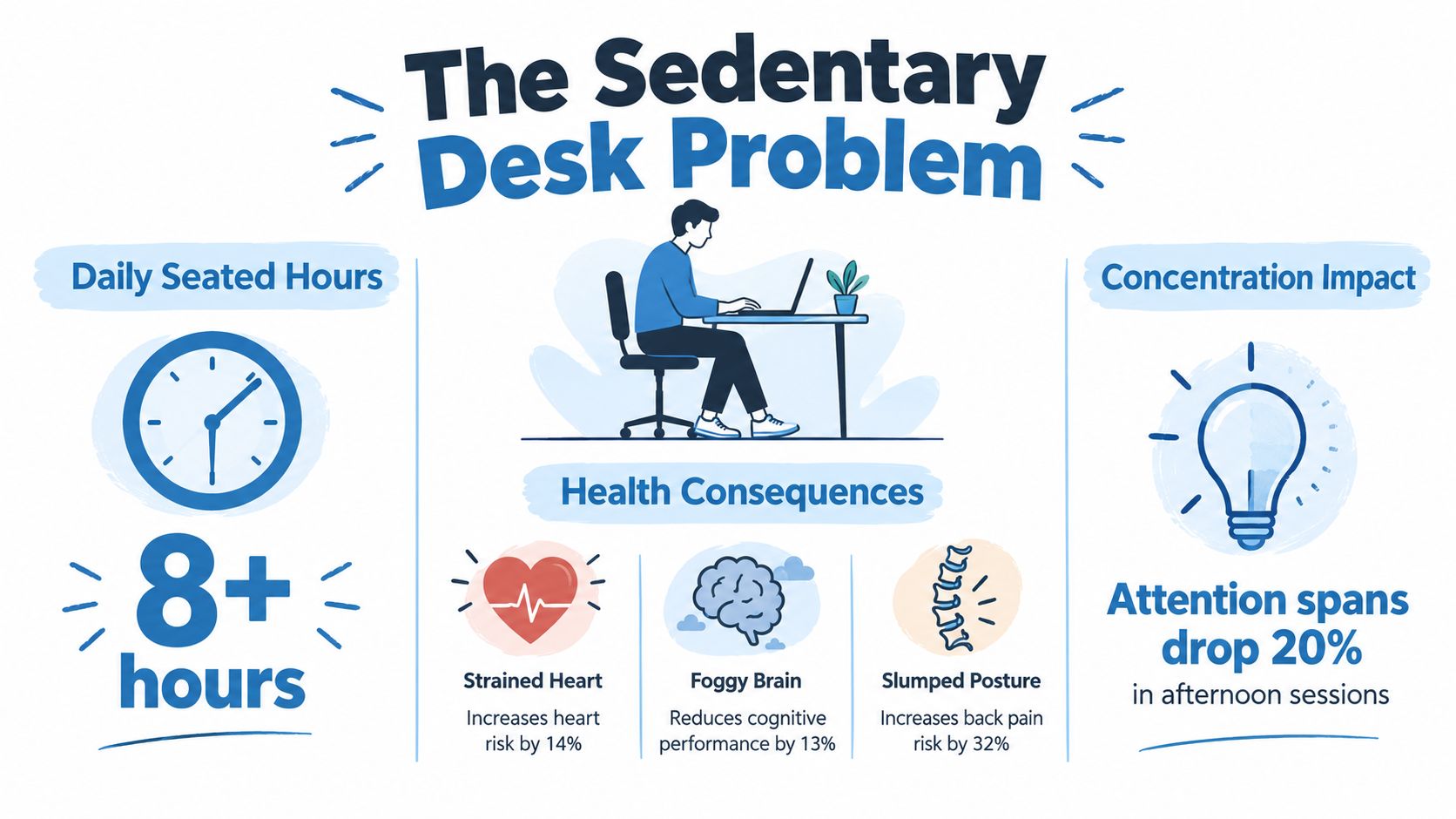
In a 2023 study of adults working from home, participants worked an average of 8.39 hours per day and spent 6.52 hours sedentary, equal to 77.71% of working time (the Irish study on sedentary behaviour among home workers). The study also recorded 672.56 minutes of total sedentary behaviour per day at baseline. Those figures show why a brief workout may not fully address a workday built around prolonged sitting.
The pattern matters as much as the total. Long, uninterrupted sitting can leave the hips, back, and shoulders feeling stiff, while sustained concentration may also become harder. Irish office research found that 66% of respondents sat at their desk for most of the day, and most participants reported 5 to 7 hours of sitting at work (Irish workplace sitting research). A desk treadmill targets those long sitting blocks by adding low-intensity movement during suitable tasks.
Why standing isn't the complete answer
Standing changes your position, but standing still can still cause fatigue and static loading. Irish guidance recommends breaking up seated work with standing tasks, sit-stand desks, and short active breaks, progressing towards about two hours of standing or light activity during the workday, and eventually four hours.
Variety is the practical goal. Alternate sitting, standing, walking, and brief movement breaks instead of treating one posture as a permanent solution. These seated posture tips from experts can help with chair height, screen position, and support. Good setup reduces strain, although it cannot make uninterrupted desk work harmless.
A desk treadmill fits this plan only when walking is comfortable and the task allows it. Email sorting, audio calls, and routine reading may tolerate gentle steps. Precise typing, detailed spreadsheets, design work, and meetings that demand close attention may suffer from slower hand control, noise, or divided focus. Cables, chairs, and a moving belt also require a clear, stable area.
The treadmill should supplement, not replace, outdoor walking, strength work, and properly timed breaks. Irish guidance advises moving roughly every 30 minutes during long periods of sitting. Adults are also advised to accumulate 2.5 to 5 hours of moderate aerobic activity weekly, or 1.25 to 2.5 hours of vigorous activity (Ireland's national physical activity and sedentary behaviour guidelines). For people whose joints, balance, workspace, or concentration make belt walking unsuitable, a seated or standing wearable option may place less demand on the work setup. BionicGym's sedentary lifestyle solutions outline that alternative approach.
A desk treadmill is therefore a task-specific movement tool, not a calorie target or a licence to remain at the desk indefinitely.
What a Desk Treadmill Actually Is and How It Works
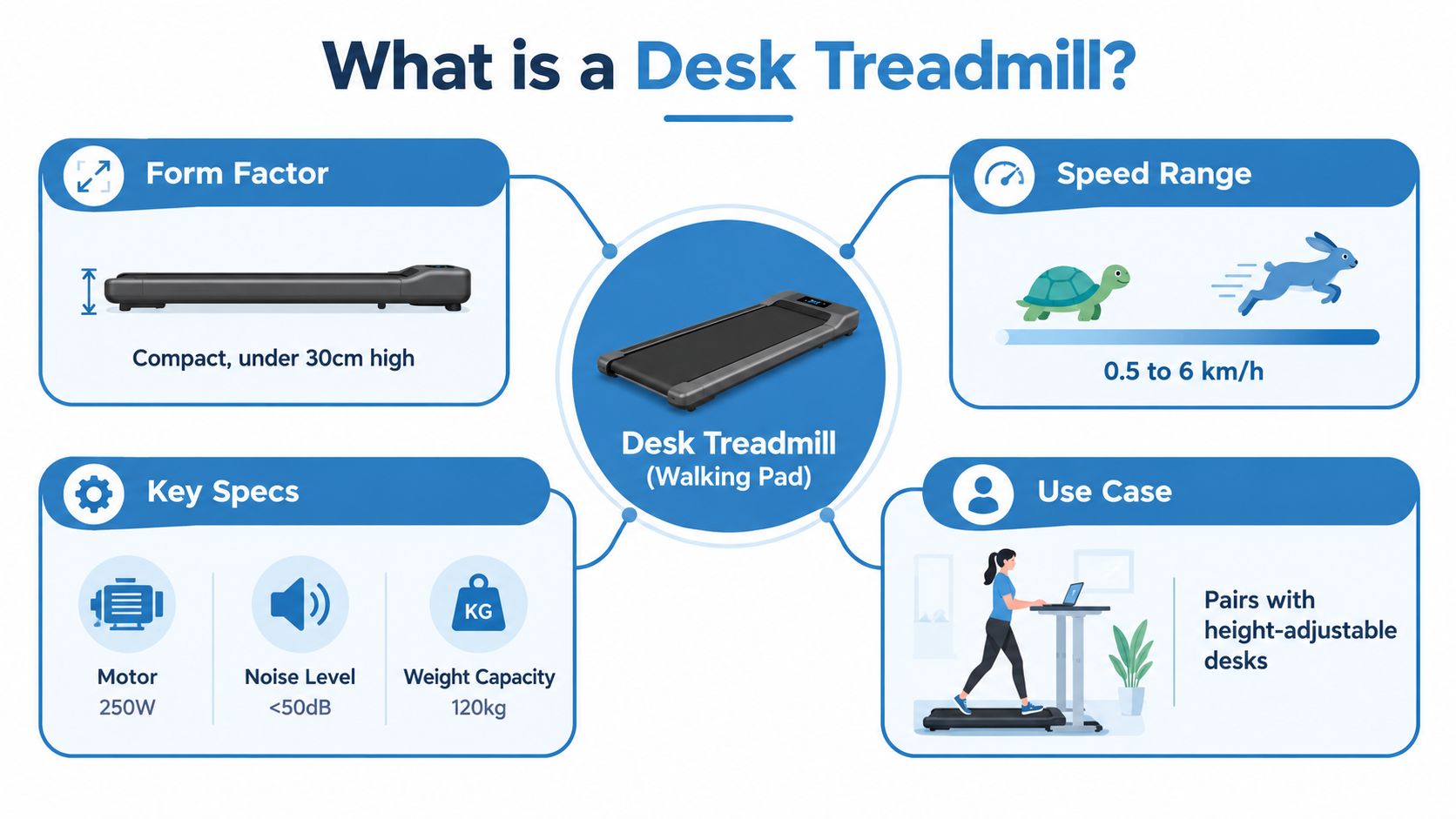
A desk treadmill, also called a walking pad, is a compact treadmill designed to sit beneath a standing or height-adjustable desk. The belt is usually lower and lighter than a running treadmill, and the intended movement is walking rather than jogging.
Start with the belt. A longer, wider walking surface gives you more room to place your feet naturally, while a compact belt saves storage space but demands greater attention to foot placement. Many under-desk models are designed around a slow working pace, often 0.5 to 4 mph, although product limits vary. The speed ceiling matters less than stable low-speed control, a responsive stop function, and a belt that doesn't drift.
The parts you'll notice every day
- Desk clearance: The desk must rise high enough to accommodate the treadmill's deck, your footwear, and a comfortable keyboard position. If your wrists bend upwards while walking, the desk is too low or the keyboard arrangement is wrong.
- Motor duty: A continuous-duty motor is better suited to repeated work sessions than a unit designed only for brief recreational use. Motor power alone doesn't tell you how stable or quiet the machine will feel.
- Rails and handles: Many walking pads lack side rails because rails interfere with the desk and reduce the open space needed for a seated-to-standing transition. That makes a clear floor and confident balance important.
- Surface stability: Put the treadmill on a level, non-rolling surface. A mat can reduce floor marking and may limit vibration transfer, especially on raised or hard flooring.
- Noise: Check the manufacturer's noise measurement and how it was taken. A motor that sounds acceptable alone may still be intrusive during calls, while foot impact can create more disturbance than the motor itself.
Manual-resistance walking pads and motorised models feel different. A manual unit moves in response to your effort and may suit someone who wants a simple, quiet walking experience. A motorised unit offers predictable speed control, which is usually easier for desk work and shared routines. Before buying, measure the desk, chair clearance, storage route, and space behind or beside the workstation. Even a slim walking pad becomes inconvenient if you can't move it without dismantling your office.
For ideas on fitting technology into a smaller room, compare the proportions and storage requirements of compact desk designs. You can also review BionicGym's office exercise equipment guide when considering movement options that don't occupy the floor beneath your desk.
Productivity, Calorie Burn, and Real Trade-Offs
The strongest case for a desk treadmill is often not intense exercise. It's the ability to add low-intensity walking during work that would otherwise be sedentary. The trade-off is that your body is moving while your hands, eyes, and brain are trying to perform tasks that may require stability and precision.
A systematic review found that treadmill workstations create stronger acute physiological effects than standing workstations. They can increase heart rate, reduce ambulatory blood pressure, and raise energy expenditure during the workday. The same review also found reductions in fine-motor computer performance, including typing and mouse pointing, compared with standing-only desks (the workplace treadmill workstation review).
That means calorie claims need context. A slow desk walk isn't automatically a vigorous workout, and a higher belt speed can make typing, screen reading, and conversation harder. Ireland's activity guidance describes moderate intensity as movement that raises breathing and heart rate while still allowing you to talk (HSE guidance on exercise intensity). Use that practical cue rather than assuming the treadmill's maximum speed reflects your useful work speed.
A balanced ledger
| Factor | Typical result | Caveat |
|---|---|---|
| Email and reading | Often compatible with slow walking | Visual bobbing and fatigue can still reduce comfort |
| Calls | Can work at an easy pace | Noise, breathlessness, and camera movement may distract others |
| Typing | Possible for routine text | Fine-motor accuracy can decline while walking |
| Mouse work | Suitable for broad navigation | Detailed selection, drawing, or spreadsheet work may suffer |
| Energy expenditure | Higher than sitting still | The amount depends on pace, duration, and the individual |
| Concentration | Light movement may feel refreshing | Dual-tasking can compete with deep focus |
| Ergonomics | Alternating positions can reduce static sitting | Poor desk height can strain wrists, shoulders, or neck |
The physical setup creates its own compromises. A moving belt can shorten your natural stride, encourage you to lean on the desk, and make a keyboard tray unstable. Your monitor may need to rise with the desk, while the keyboard must remain close enough to avoid reaching. If you find yourself gripping the desk, looking down, or correcting your footing repeatedly, the workstation is costing more attention than it returns.
For desk workers who want cardio without interrupting precision tasks, proven cardio for desk workers offers a different way to think about movement layering. The sensible comparison isn't treadmill versus no exercise. It's which option lets you accumulate movement consistently without degrading the work you need to do.
Matching the Desk Treadmill to Different Personas
A desk treadmill suits some workflows much better than others. The key distinction is whether your work benefits from background movement or demands a stable body and quiet concentration.
Four common desk-bound profiles
The remote worker on back-to-back calls may find a walking pad useful for audio meetings, listening sessions, and routine catch-ups. Keep the pace low enough to speak comfortably and maintain a stable camera image. It becomes less suitable when you need to present detailed material, take rapid notes, or remain visually still for a formal client conversation.
The writer or coder needs a more cautious setup. Brainstorming, reading, reviewing documentation, or dictating rough notes may work while walking. Final editing, dense prose, debugging, and precise keyboard shortcuts are better handled seated or standing still, because the documented fine-motor trade-off can affect typing and mouse control.
The casual gamer or content streamer has a split use case. A walking pad may fit passive viewing, menu navigation, or a relaxed stream where movement is not part of the performance. It is a poor match for reactive gaming, fast aiming, or any setup where a foot misstep could affect play or safety.
The desk user with knee, hip, or lower-back sensitivity should treat walking tolerance as an individual question, not a marketing promise. A belt can reduce sitting, but it still involves repeated weight-bearing steps. Anyone recovering from a recent joint injury should obtain clinician sign-off before starting. Anybody with a serious medical condition or injury should consult with their medical practitioner before starting any new exercise program.
| Persona | Fit level | Best use case | Watch out for |
|---|---|---|---|
| Remote caller | Moderate to strong | Listening, routine calls, low-demand meetings | Camera movement, noise, note-taking |
| Writer or coder | Selective | Reading, outlining, review, dictation | Typing accuracy, deep focus, mouse precision |
| Casual gamer or streamer | Selective | Passive content, relaxed streaming | Reactive controls, balance, cable hazards |
| Joint-sensitive desk user | Trial only | Short, easy walking if comfortable | Pain flare, fatigue, repeated loading |
Treat suggested speeds as starting points, not guarantees. A cautious trial might use 1.0 to 1.5 mph for 20-minute intervals, then assess soreness during the session and later that day. The brief persona thresholds often quoted in product content, such as a fixed maximum session length or universal desk height, can't safely apply to every body and workstation. Stop if pain, instability, unusual breathlessness, or loss of control appears.
For small rooms where a floor-based machine may be awkward, compare cardio equipment for small spaces. The best option is the one you can set up, use, stop, and store without creating a new obstacle.
Why a Wearable Cardio Alternative Can Be the Smarter Pick
A desk treadmill solves inactivity by adding walking to work, but it also adds another task. You must place your feet, manage the belt, adjust the desk, and accept some interference with typing, mouse control, reading, or video calls. A wearable cardio system such as BionicGym uses app-guided programmes and leg wraps to deliver tuned electrical impulses that stimulate large leg muscles while you sit, stand, or move normally.
That difference is about task fit, not just calorie numbers. Walking can suit listening, routine calls, or low-demand meetings. Seated exercise may suit detailed writing, coding, dense reading, and steady camera presence because it avoids the postural and balance adjustments that walking requires. It also removes the treadmill's belt, floor-space, cable, and trip-management concerns.
The trade-off is straightforward. A wearable system does not replace walking breaks, outdoor activity, or the health benefits of varied movement. It can add exercise where a treadmill would make the work itself less accurate.
BionicGym was invented and developed by a medical doctor. The publisher describes it as an FDA-cleared medical device, not an FDA-approved drug, and it should be used according to its instructions. It is not suitable for everyone, including people with certain contraindications such as pacemakers or pregnancy. Review the product safety information and seek professional advice where appropriate. Learn more in the guide to the FDA-cleared wearable cardio device.
Practical rule: If a movement device makes your core task less accurate, it may be the wrong device for that task, even if it creates more physical activity.
What the wearable approach can and can't promise
BionicGym communications should set realistic expectations. The system is a sugar-hungry form of exercise, and exercise is a pillar of treatment for conditions such as type 2 diabetes, but BionicGym is not a medical treatment. Results depend on consistent use, suitable intensity, and attention to how your body responds.
Anyone with a serious medical condition or injury should consult their medical practitioner before starting a new exercise programme. Use should also stop if the device causes concerning symptoms or discomfort.
The publisher's product claims describe vigorous exercise effects such as increased heart rate, breathlessness, and sweat. Those effects should be represented accurately rather than used to imply that every session will feel strenuous. A session may be gentle and sustained, or more demanding after the user has built tolerance and selected a suitable programme.
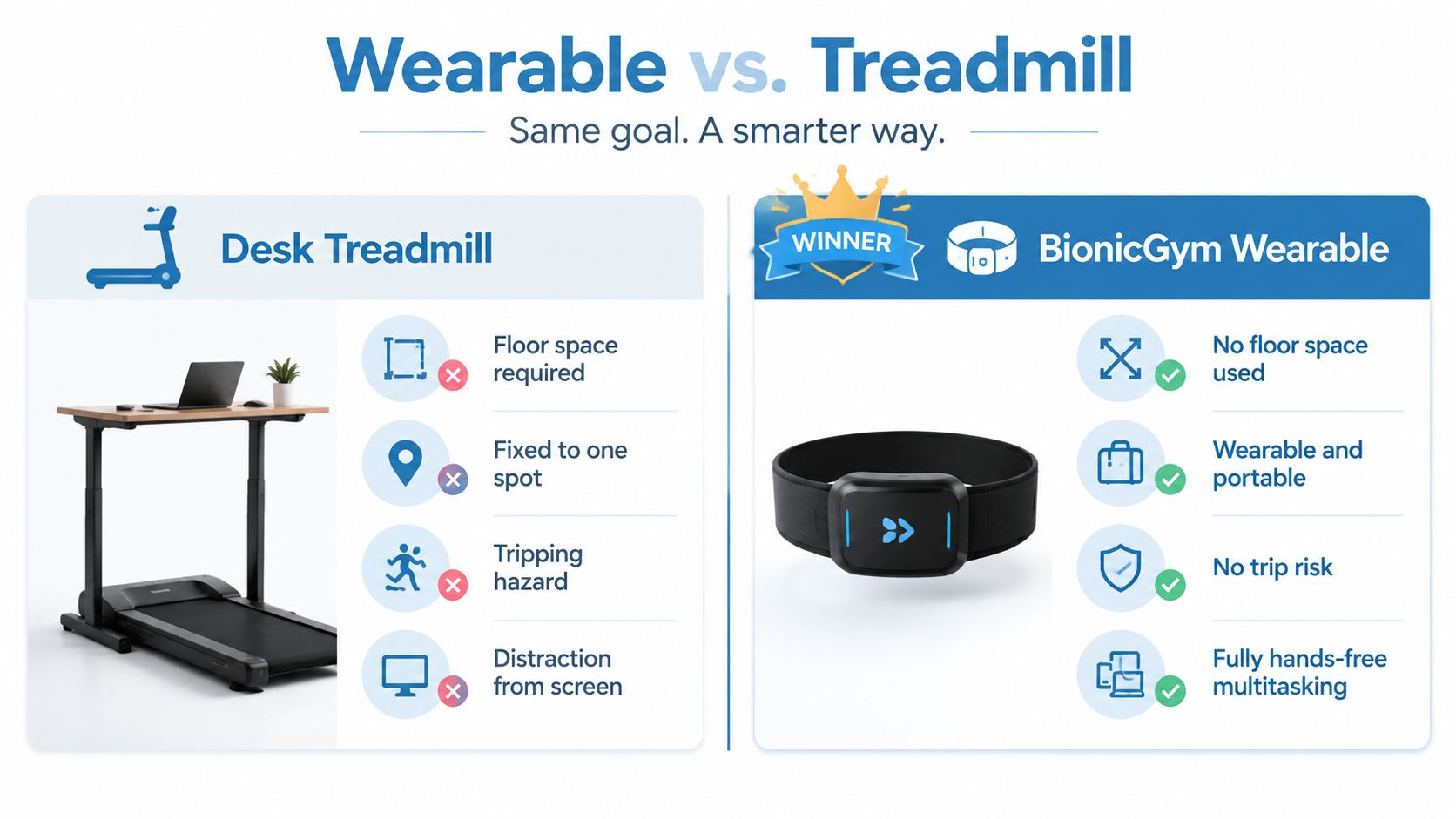
The wearable option may suit deep-focus knowledge work, shared offices, compact homes, joint-sensitive users, and people who want movement to layer onto existing routines. Irish guidance supports accumulating activity in manageable bouts, and the European Commission's Ireland physical activity factsheet notes that shorter sessions can count when each lasts at least 10 minutes. Short seated sessions can therefore complement walking breaks, standing work, and outdoor activity, while leaving demanding desk tasks undisturbed.
A Practical Checklist for Choosing the Right Option
A desk treadmill earns its space only if it fits your room, desk, work demands, and stopping habits. Test the setup in use, rather than judging it from a product photograph. The right comparison includes joint comfort, task accuracy, noise, and how easily you can put the equipment away.
The desk treadmill check
- Room: Measure the walking position, chair position, storage route, and floor area required to move the unit. Check that the floor is level and that nothing blocks ventilation around the motor.
- Noise: Look for a noise rating with a stated measurement distance, rather than relying on “quiet” in a listing. Account for neighbours, shared walls, meetings, and vibration. A suitable mat or rubber feet may help, but cannot make every machine appropriate for calls.
- Desk: Confirm the desk's minimum and maximum height, desktop depth, monitor position, and keyboard clearance. Your wrists should stay neutral, and you should not need to lean heavily on the desk. If typing becomes less accurate, reserve walking for listening, reading, or routine calls.
- Speed and sessions: Choose controlled low-speed operation, a clear emergency stop, and a runtime that matches your planned use. Start with short, manageable sessions and increase exposure only if your joints and concentration remain comfortable.
- Budget: Compare the purchase price with warranty cover, return terms, servicing, belt care, and the likelihood that you will keep the machine accessible. Local sit-stand pricing, including retrofit systems and electric adjustable desks, shows that changing a workstation can represent a meaningful ergonomic investment. Treat the treadmill as part of that setup, not as a separate fitness purchase.
A low price does not compensate for equipment that stays folded away, disrupts calls, or makes detailed work harder.
Score the wearable alternative on the same basis
Assess whether the alternative needs floor space, works during your actual desk tasks, offers adjustable intensity, and has clear safety exclusions. Check whether it supports gentle sessions as well as more demanding intervals, and whether the return policy gives you enough time to judge comfort and regular use.
A wearable cardio system such as BionicGym may suit desk-bound users who need seated movement, have limited room, or find repeated walking uncomfortable. It still requires attention to safety guidance and medical advice where a serious condition or injury is involved.
Use a simple rule. If three or more criteria fail on the desk-treadmill side, choose a wearable option or a non-equipment walking break instead. Outdoor walking, movement breaks, standing during part of a call, and strength work can all support a more active week without requiring a treadmill.
Pulling It Together and Choosing Your Next Step
The opening Irish data point changes the buying question. When 77.71% of working time is sedentary in the cited home-working sample, the goal isn't to chase a dramatic calorie figure. It's to create movement opportunities that survive a real workday, including meetings, deadlines, focused writing, interruptions, and fatigue.
Use three decision paths.
If you're a remote worker who needs typing focus, pilot a walking pad only for passive tasks. Keep the pace around 1 to 2 mph during listening, reading, routine email, or low-stakes calls, then move to sitting or standing still for final writing, coding, detailed spreadsheets, and precise mouse work. Measure whether the movement improves your day without creating corrections or mental drain.
If you're joint-sensitive or work in a shared office, don't assume a treadmill is the gentlest option because it moves slowly. Repeated steps can still be uncomfortable, and noise or storage can make consistent use unlikely. A wearable EMS cardio system such as BionicGym may suit seated movement better, provided you follow its safety information and obtain medical advice when a serious condition or injury is involved.
If you're curious but undecided, run a 14-day measurement protocol before committing to a larger purchase. Record your walking or exercise sessions, perceived focus, typing accuracy, soreness, and whether the equipment was easy to start and put away. A device that looks impressive but remains unused isn't solving sedentary work.
Choose your primary blocker first: typing, knees, noise, or focus. Match that blocker to the option that removes it, then test the arrangement for two weeks before scaling up. The most sustainable solution may combine short walking breaks, standing work, outdoor movement, and seated exercise rather than relying on one device for the entire day.
BionicGym offers app-guided wearable exercise that can fit around desk work without placing a treadmill beneath your workstation. If you want to compare a hands-free movement option with a walking pad, visit BionicGym and review the product, safety, and programme information before deciding.